2 Experimental data handling#
This notebook introduces the functions and datatypes used in estim8 when working with experimental data. It covers the following topics:
creating
MeasurementandExperimentobjects for custom problemsobservation mapping
error modeling
from estim8 import visualization, datatypes
import pandas as pd
import numpy as np
import matplotlib.pyplot as plt

# load data
data = pd.read_excel('SimpleBatch_Data.xlsx', index_col=0, header=(0, 1))
data.head()
| Time | X | S |
|---|---|---|
| h | g/L | g/L |
| 0.0 | 0.176200 | NaN |
| 0.1 | 0.318313 | NaN |
| 0.2 | 0.285270 | NaN |
| 0.3 | 0.218600 | NaN |
| 0.4 | 0.248210 | NaN |
2.1 Experiments & Measurements#
In estim8 the data is structured in Experiment objects, which consist of individual Measurement objects.
# drop multiindex header
data.columns = data.columns.droplevel(1)
exp = datatypes.Experiment(data)
exp.measurements
[Measurement(name=X, replicate_ID=None),
 Measurement(name=S, replicate_ID=None)]
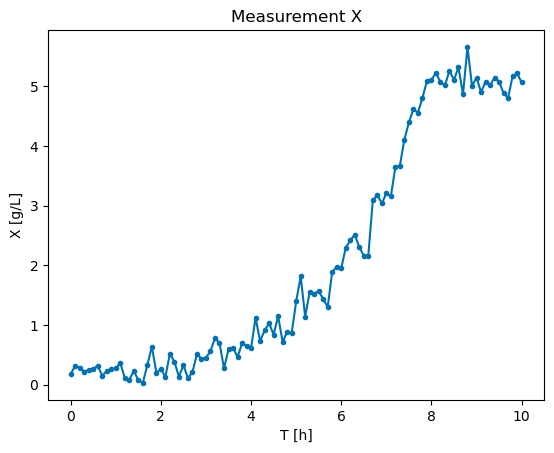
plt.plot( exp['X'].timepoints, exp['X'].values, marker=".")
plt.title('Measurement X')
plt.xlabel('T [h]')
plt.ylabel('X [g/L]')
Text(0, 0.5, 'X [g/L]')
An Experiment can also be created by passing defined Measurement objects:
# create measurement objects
measurements = [
    datatypes.Measurement(
        name=column,
        timepoints=data.index,
        values=data[column].values
    )
    for column in data.columns
]

# create Experiment bbject
exp = datatypes.Experiment(measurements=measurements)
2.2 Observation mappings#
To map specific measurements to model states with different names, one can define an observation mapping.
# create a dataframe with different names
df = data.copy()
df.columns= ['obs_X', 'obs_S']
display(df.head())

# define an observation mapping
observation_mapping = {
#   measurement:    model
    'obs_X':        'X',
    'obs_S':        'S'
}

exp = datatypes.Experiment(df, observation_mapping = observation_mapping)
| obs_X | obs_S | |
|---|---|---|
| 0.0 | 0.176200 | NaN |
| 0.1 | 0.318313 | NaN |
| 0.2 | 0.285270 | NaN |
| 0.3 | 0.218600 | NaN |
| 0.4 | 0.248210 | NaN |
2.3 Error modeling#
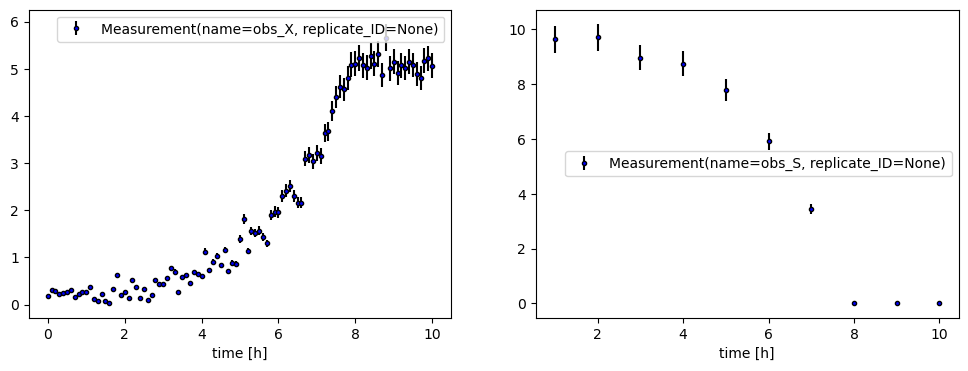
In objective functions like the weighted sum of squared residuals (WSS) or negative Log-likelihood (negLL) we use the measurement noise \(\sigma\) as weights when quantifying model discrepancy.
2.3.1 Linear error model#
Per default, estim8 uses a linear error model, which describes the noise as
where slope and offset refer to the relative and absolute error respectively.
from estim8.error_models import LinearErrorModel

# create a error model instance
my_error_model = LinearErrorModel(slope=0.05, offset=0.01)

# pass the error model to the experiment, which will pass it further to individual measurements
exp = datatypes.Experiment(df, error_model=my_error_model)

# plot measurement with errorbars
fig, axes = plt.subplots(1,2, figsize=(12,4))
for ax, measurement in zip(axes, exp.measurements):
    visualization.plot_measurement(ax=ax, measurement=measurement, color='blue')
    ax.set_xlabel("time [h]")
    ax.legend()
2.3.2 Measurement-specific error models#
# create an error model instance with an absolute error only e.g. fo a specific measurement
error_model_X = LinearErrorModel(slope=0, offset=0.2)

# create a measurement object with unique error model
measurement_X = datatypes.Measurement(
    name='X',
    timepoints=data.index,
    values=data['X'].values,
    error_model=error_model_X
)

# plot measurement with errorbars
fig, ax = plt.subplots()
_ = visualization.plot_measurement(ax=ax, measurement=measurement_X, color='blue')
ax.set_xlabel('Time [h]')
ax.legend()
<matplotlib.legend.Legend at 0x199277c6ef0>

Alternatively, one can always provide an array of error values when creating a Measurement object.
# create an array of error values with same shape as measurement values
errors = np.ones_like(data['X'].values)*0.4

meas = datatypes.Measurement(
    name='X',
    timepoints=data.index,
    values=data['X'].values,
    errors=errors
)

# plot the measurement with errors
_, ax = plt.subplots()
visualization.plot_measurement(ax=ax, measurement=meas, color='blue')
ax.legend()
ax.set_xlabel('time [h]')
Text(0.5, 0, 'time [h]')

2.3.3 Custom error models#
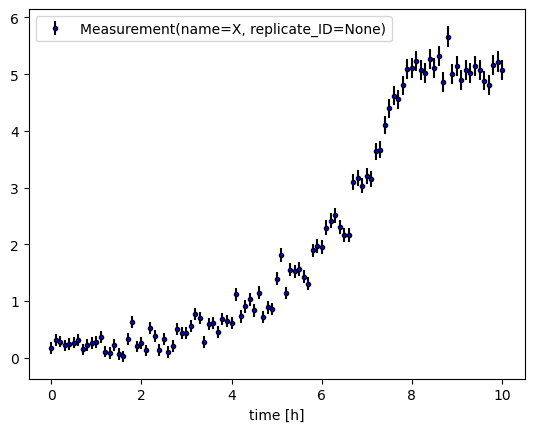
Own error model classes can be easily implemented by inheriting from estim8’s base class BaseErrorModel. The custom class implementation should at least have the class method generate_error_data, which recieves a numpy.ndarray of datapoints and returns an array of errors.
from scipy.stats.distributions import norm, rv_continuous
from estim8.error_models import BaseErrorModel

class PoylnomialErrorModel(BaseErrorModel):

    def __init__(self, a,b,c):
        self.a = a
        self.b = b
        self.c = c
        super().__init__()


    def generate_error_data(self, values: np.array) -> np.array:
        return self.a * values **2 + self.b * values + self.c


# create an instance of PolynomialErrorModel
polynomialErrorModel = PoylnomialErrorModel(
    a=1e-3,
    b=1e-2,
    c=1e-1
)

# create a Measurement object, passing the custom error model
meas = datatypes.Measurement(
    name = 'X',
    values = data['X'].values,
    timepoints=data.index,
    error_model=polynomialErrorModel

)

# plot the measurement with errors
_, ax = plt.subplots()
visualization.plot_measurement(ax=ax, measurement=meas, color='blue')
ax.legend()
ax.set_xlabel('time [h]')
Text(0.5, 0, 'time [h]')
2.4 Error distributions#
Uncertainty quantification techniques like profile likelihoods (see Notebook 5) and Monte Carlo sampling (see Notebook 6) or calculations of a statistical likelihood require modeling the data via distributions.
2.4.1 Basics on likelihood and data distribution#
For likelihood driven objectives such as the negLL function, the data is described via a probability distribution. In many cases it is assumed that the data is normally distributed. Parametrized by mean \(\hat{y}\) and standard deviation \(\sigma\), the probability density function (PDF) follows
$
$
Per default, estim8’s ErrorModel use a normal distribution. For the first datapoint of the biomass measurements X from above e.g., the likelihood \(p\) of the data \(y\) given a model prediction \(y_{model}\) is determined by evaluating \(pdf(y_{model})\):
meas = datatypes.Measurement(
    name='X',
    timepoints=data.index,
    values=data['X'].values,
    error_model= LinearErrorModel(slope=0, offset=0.05) # we use an absolute error model with sigma=0.05 for every datapoint
)

# get the first datapoint
y_hat = meas.values[0]
sigma = meas.errors[0]

# create array of some possibl values for y
y_model_range = np.linspace(max(0,y_hat-6*sigma), y_hat+6*sigma, 100)
likelihood_y_model_range = meas.error_model.error_distribution.pdf(x=y_model_range, loc=y_hat, scale=sigma)
# plot the pdf for the y range
plt.plot(y_model_range,likelihood_y_model_range )
plt.fill_between(y_model_range, y1=np.zeros_like(y_model_range), y2=likelihood_y_model_range, alpha=0.1, color='blue')
pdf_y_hat = meas.error_model.error_distribution.pdf(x=y_hat, loc=y_hat, scale=sigma)


# define a "simulated" model prediction for y
y_model = y_hat-1.6*sigma
likelihood_y_model = meas.error_model.error_distribution.pdf(x=y_model, loc=y_hat, scale=sigma)

# plot y_hat
plt.vlines(x=y_hat, ymin=0, ymax=pdf_y_hat, linestyles='dashed', colors='green')
plt.annotate(r"$\hat{y}$="+str(y_hat), xy=(y_hat*1.1, pdf_y_hat/2), color='green')
# plot sigma
plt.hlines(y=0, xmin=y_hat, xmax=y_hat+sigma, linestyles='dashed', color='orange')
plt.annotate(r"$\sigma$="+str(sigma),xy=(y_hat+(sigma/2), 0.1),color='orange')


# plot likelihoood of model prediction
plt.vlines(x=y_model, ymax=likelihood_y_model, ymin=0, color='red', linestyles="dashed")
plt.hlines(y=likelihood_y_model, xmin=min(y_model_range), xmax=y_model, colors='red',linestyles='dashed')
plt.annotate(r'$y_{model}$', xy=(y_model*1.1, likelihood_y_model/2), color='red')
plt.annotate(r"$p(y|y_{model},\sigma)$", xy=(y_model/2, likelihood_y_model*1.1), color='red')

plt.xlabel('y')
plt.ylabel('PDF(y)')
plt.title(r"Likelihood of model prediction $y_{model} \; given \; normally \; distributed \; data$")
fig.tight_layout()

2.4.2 Working with custom error distributions#
In order to use different or completely customized error distributions, a distribution instance (a subclass of scipy.stats.rv_continuous ) can be passed when creating an error model object.
For an overview of available continuous distributions, check out the docs of scipy.
In the example below, the student t distribution is used, which additionally takes a parameter df as input:
from scipy.stats import rv_continuous, t

err_model = LinearErrorModel(
    slope=0,
    offset=0.05,
    error_distribution=t,
    error_distribution_kwargs={'df':10}
)